

What’s logged?
- Text messages exchanged between your teammates and the contact.
- Names of the teammate(s) and the contact involved.
- Date and time of each message.
- Conversation status updates, including when a conversation is opened, closed, or assigned to a team member.
How logs are created
- When a conversation starts, a log is generated 3 hours later, summarizing all activities within that period.
- New logs are created every 3 hours, capturing the latest interactions.
- If no messages or activities occur within a 3-hour window, no log is generated.
Viewing activity logs in HubSpot
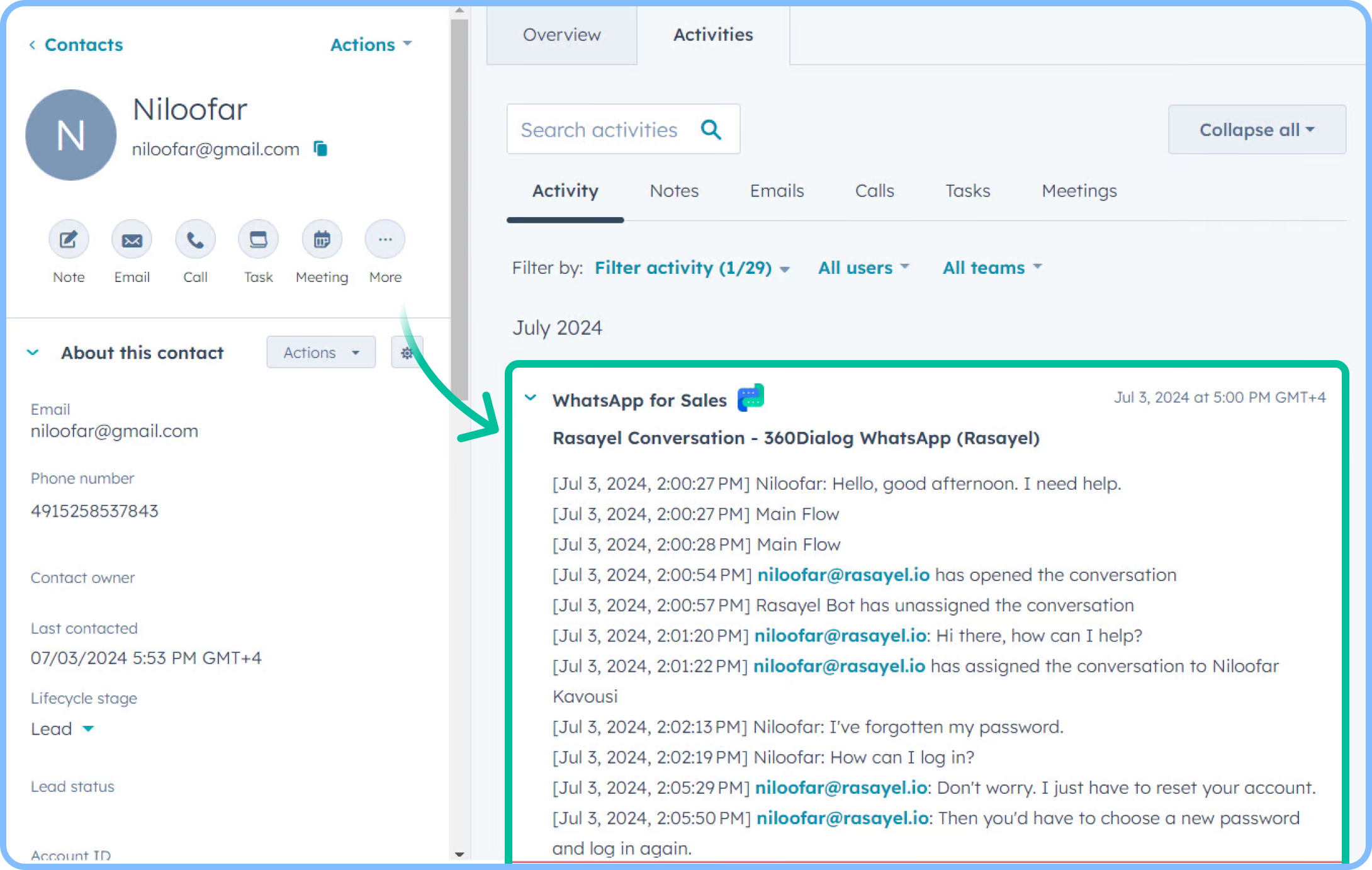
To see WhatsApp activity logs for a contact in HubSpot:- Open the HubSpot Contact Page.
- Click Activities → Filter activity dropdown.
- Check the WhatsApp for Sales box.
- Click outside the dropdown to apply filters and view the list of logs.
- Click on a specific log to expand details, including timestamps and message content.
Use cases for activity logging
Activity logs provide valuable insights into customer interactions. You can:- Track engagement trends - Monitor customer responsiveness and communication frequency.
- Analyze message types - Identify trends in WhatsApp templates, text messages, and multimedia usage.
- Segment reports - Break down activities by channel, template type, or assigned team member.
- Measure agent performance - Evaluate team response times and overall engagement.