> ## Documentation Index
> Fetch the complete documentation index at: https://docs.rasayel.io/llms.txt
> Use this file to discover all available pages before exploring further.
# Import contact list
You can import HubSpot contact lists directly to Rasayel
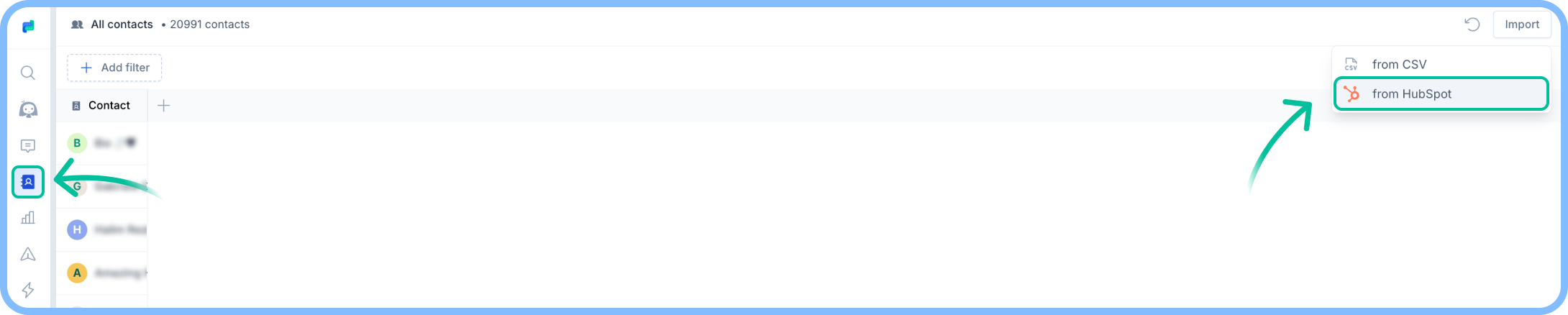 **To import a HubSpot list:**
1. Prepare the contact list on HubSpot.
2. In Rasayel, head to [**Contacts**](https://app.rasayel.io/contacts) **> Top right corner > Import > from HubSpot**.
3. Choose your contact list.
* If your list isn’t showing, try pressing **Reload HubSpot Lists**.
4. Press **Continue**.
Contacts’ phone numbers **must** include valid phone numbers with the international code; otherwise, they will not be imported.
**To import a HubSpot list:**
1. Prepare the contact list on HubSpot.
2. In Rasayel, head to [**Contacts**](https://app.rasayel.io/contacts) **> Top right corner > Import > from HubSpot**.
3. Choose your contact list.
* If your list isn’t showing, try pressing **Reload HubSpot Lists**.
4. Press **Continue**.
Contacts’ phone numbers **must** include valid phone numbers with the international code; otherwise, they will not be imported.