> ## Documentation Index
> Fetch the complete documentation index at: https://docs.rasayel.io/llms.txt
> Use this file to discover all available pages before exploring further.
# Chatbot errors
There are multiple errors that will prevent your bot from being published. If you have any errors in your bot the **Set live** button will be grayed out and you will see the \*\*error menu \*\*next to the chatbot name.
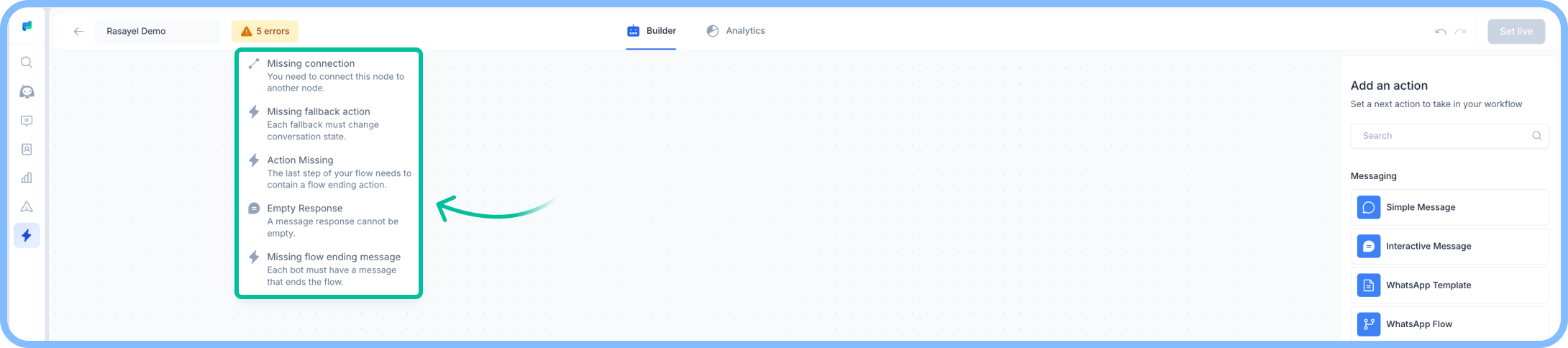 Clicking on the error will span your view to the affected node.
**Example errors:**
* **Empty response -** The message node has an empty body
* **Missing flow ending message -** Your flow is missing one of the [flow-ending action nodes](https://www.notion.so/Automations-and-Chatbots-1adbc42c93ac80309c19d2176a09046c?pvs=21)
* **Missing list name -** You have an interactive message that contains a list that hasn’t been named.
## Best practices
* Keep bot messages clear and to the point—users prefer quick, easy-to-read responses.
* Always set up fallbacks to handle exceptions and keep the flow going.
* Leverage ‘Notes’ to notify you whenever the bot struggles to continue an action.
* Test different versions of your bot using version tracking to see what works best.
* Regularly review and refine your bot’s performance based on user interactions.
Clicking on the error will span your view to the affected node.
**Example errors:**
* **Empty response -** The message node has an empty body
* **Missing flow ending message -** Your flow is missing one of the [flow-ending action nodes](https://www.notion.so/Automations-and-Chatbots-1adbc42c93ac80309c19d2176a09046c?pvs=21)
* **Missing list name -** You have an interactive message that contains a list that hasn’t been named.
## Best practices
* Keep bot messages clear and to the point—users prefer quick, easy-to-read responses.
* Always set up fallbacks to handle exceptions and keep the flow going.
* Leverage ‘Notes’ to notify you whenever the bot struggles to continue an action.
* Test different versions of your bot using version tracking to see what works best.
* Regularly review and refine your bot’s performance based on user interactions.